// Reporting

Complete reporting for consumer brands.

Every report you need to run an omnichannel brand — from basic sales reports to detailed cohort analysis and velocity by retailer — built in and ready to run. Stop wrestling with generic BI tools.

Inside Reporting

01 — Out of the box

Complete reporting for consumer brands.

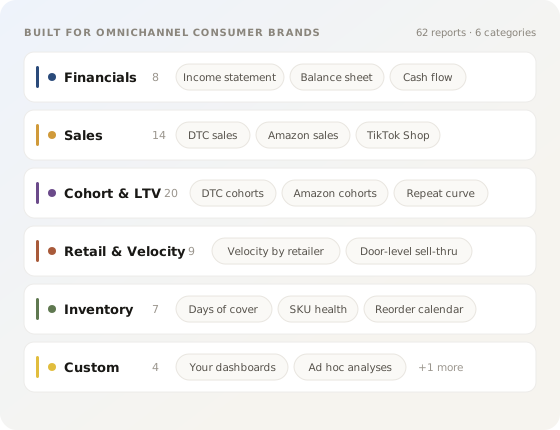
We’ve built all the reports you need to run an omnichannel brand — from basic sales reports to detailed cohort analysis and velocity by retailer. Stop relying on generic BI tools and get every report you need out of the box.

  • Sales, margin, inventory and channel reporting
  • Cohort analysis, LTV and repeat curves
  • Velocity by retailer, by door, by SKU
Reports library catalog illustration
Narrative commentary illustration
02 — Narrative

Reports that explain themselves.

Every chart ships with a generated commentary block — what changed, why, and what to watch. Edit the language inline, lock the bits you like, and Drivepoint keeps the variance commentary fresh next month.

  • Auto-generated variance commentary
  • Editable, lockable narrative blocks
  • Tied directly to the underlying drivers
03 — Custom & ad hoc

Build custom reports with AI.

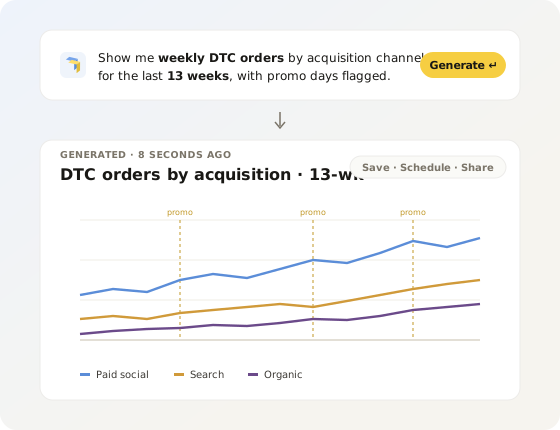
Use our built-in report builder or spin up ad hoc reports and analyses with Claude — or any other AI tool you like. It’s all backed by the same underlying data, so a one-off question and a recurring board chart speak the same language.

  • Built-in no-code report builder
  • Ad hoc analysis via Claude or your AI of choice
  • Same data layer powering every answer
Custom AI report illustration
Export share schedule illustration
04 — Export, share, schedule

Reporting on autopilot.

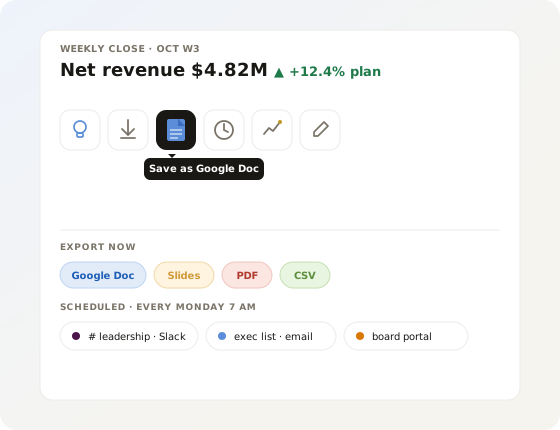
Get the team the information they need to take action — without anyone chasing a deck. Schedule via email or Slack, export to Google Docs, Slides or PDF with a click, and let the right slice find the right person on the cadence you set.

  • Scheduled sends to Slack and email
  • One-click export to Google Docs, Slides, PDF
  • Per-recipient, role-aware filtering
05 — One source of truth

Everything ties out.

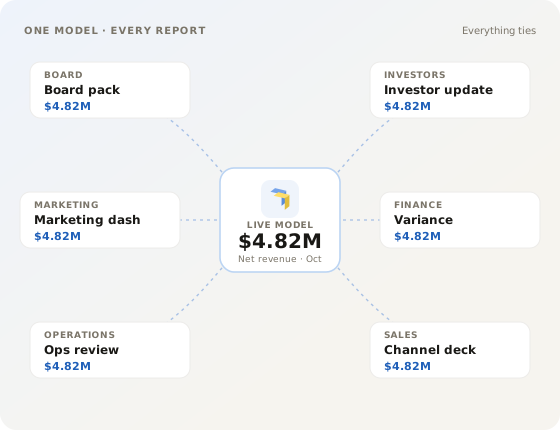
Across models and reports, the numbers stay the numbers. Marketing, finance, sales and ops finally speak the same language — and stop spending the first thirty minutes of every meeting arguing over whose data is right.

  • One data layer powering every report
  • Consistent definitions across teams
  • No more reconciling spreadsheets in the meeting
Everything ties out hub illustration
// OUTCOMES

What changes when reporting builds itself.

01

Get your Sundays back.

The board update writes itself the moment the close lands. No more rebuilding the same deck from scratch every cycle — open, review, send.

02

Every chart explains itself.

Auto-generated commentary tells the story behind the numbers — what changed, why, and what to watch — tied directly to the underlying drivers.

03

One source, every audience.

Board, investors, ops leads, channel managers — each gets the slice they need, on the cadence you set, in the channel they live in.

04

Reports stay in sync, automatically.

When the model updates, every dashboard, deck and digest updates with it. No stale numbers, no version mismatches, no last-minute corrections.

// FAQ

Reporting questions, answered.

What finance teams ask before they stop building reports manually.

Drivepoint ships with a complete reporting library built for omnichannel consumer brands. That includes sales reporting by channel, SKU, and region; gross margin and COGS analysis; cash flow and runway; inventory and velocity by retailer and door; cohort analysis and LTV curves; variance to plan; and board and investor packs. These are not generic BI templates. They include the specific metrics, definitions, and comparisons consumer brand finance teams need, including retail-specific formats like sell-through by door and trade spend reconciliation.

Yes. Every report in Drivepoint ships with auto-generated commentary that explains what changed, why it changed, and what to watch. The AI drafts line-by-line variance commentary for sales, gross margin, opex, and cash. You edit, accept, or rewrite inline. The next reporting cycle, Drivepoint remembers the tone and framings you kept. Over time, the commentary drafts get closer to what you would have written yourself. Most finance teams move from a blank-page reporting cycle to a 20-minute review.

Yes. Drivepoint supports one-click export to Google Docs, Google Slides, and PDF. You can also schedule reports to be delivered via email or Slack on whatever cadence you set: weekly, monthly, or triggered by a model update. Role-aware filtering means each recipient gets the slice of data relevant to them. Board members, ops leads, and channel managers each get what they need without you building separate versions.

Drivepoint pulls data from every channel into one consolidated reporting layer, so you can report at the total brand level or drill into any channel (DTC versus Amazon versus wholesale versus retail) with consistent definitions across all of them. Retail portals from Target, Walmart, and Whole Foods connect and normalize directly, so sell-through, deductions, and velocity by door appear in the same report as your Shopify and Amazon data. Marketing, finance, and operations work from the same numbers instead of spending the first 30 minutes of every meeting reconciling whose data is right.

Yes. Drivepoint generates board-ready financial reports, including P&L, cash flow, variance to plan, and narrative commentary, automatically when the close lands. The format stays consistent cycle to cycle, commentary is drafted by the AI, and exports go directly to Google Slides or PDF with one click. Mad Rabbit went from a fragmented manual reporting process to board-ready outputs with a single accountant. Reports that used to take days to prepare now take under an hour to review and send.