// Modeling

Financial models your whole team can actually use.

Drivepoint uses Excel as the modeling surface — not a clone, the real thing. No new tool to learn, no proprietary format. Every model lives in one place, syncs back to your data layer, and stays current without the monthly actualization ritual.

Inside Modeling.

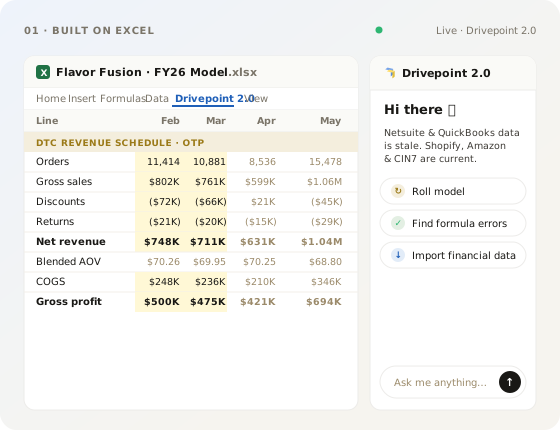
01 — Built on Excel

The modeling surface you already know.

Drivepoint uses Excel as the modeling surface — not a clone, not a lookalike, the real thing. No learning curve, no proprietary file format, no asking the team (or the agents) to learn a new tool. Just a supercharged version of the best modeling tool ever invented.

  • Pre-built DTC, wholesale and retail driver libraries
  • Channel-level cohorts and unit economics
  • Bottom-up roll-ups to a board-ready P&L
Built on Excel illustration
A home for every model illustration
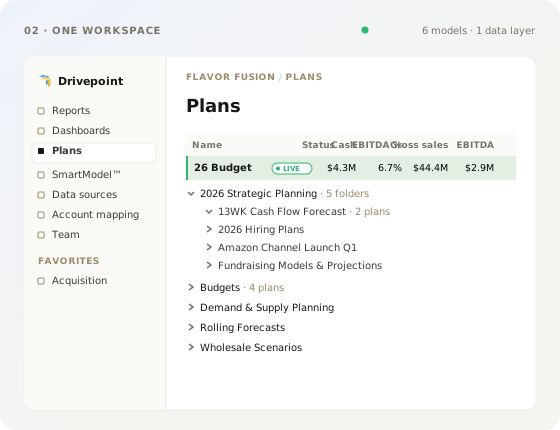
02 — A home for every model

One place for everything to live.

3-statement, cash flow, inventory, headcount, scenario branches — all in one place, talking to each other, with great sharing and permissions built in. Every plan is synced back to the data layer, so variance analysis and live tracking-to-plan are a snap.

  • Unlimited side-by-side scenarios
  • One-click clone, branch and compare
  • Shareable, view-only links for the C-suite
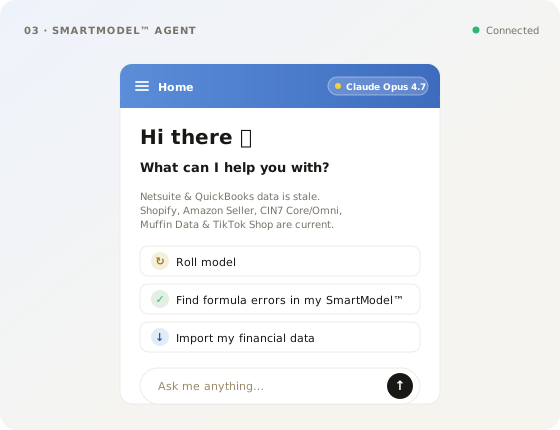
03 — SmartModel™ Agent

AI does the grunt work, you do the thinking.

Modeling value has never been about being the best Excel jockey — it’s about using your brain. SmartModel™ Agent handles the mechanical work — wiring tabs, building schedules, chasing #REF errors, refactoring sheets — while you stay focused on the higher-order thinking.

  • Cell-level comments and @mentions
  • Granular permissions per row, tab, scenario
  • Full version history and rollback
SmartModel Agent illustration
Live actuals illustration
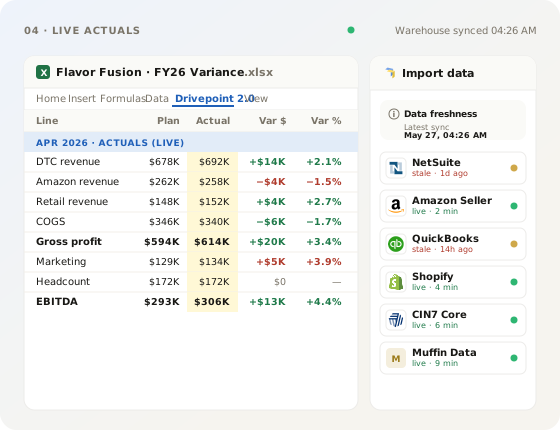
04 — Live actuals

Never actualize your model again.

Every Drivepoint model is live-connected to your data layer. Update hundreds of metrics in seconds, run complex driver changes, and stop maintaining tab after tab of input sheets. Actuals just show up — and the model rolls forward on its own.

  • Automatic forecast-vs-actuals tracking
  • Driver-level error attribution
  • Suggested re-forecasts, you approve them
// OUTCOMES

What changes when modeling lives on top of Excel — and stays live.

01

No new tool to learn.

Your team keeps the formulas, shortcuts and muscle memory they already have. Drivepoint adds the connective tissue — without asking anyone to relearn how to model.

02

One workspace, every model.

3-statement, cash, inventory, headcount, scenarios — all in one place, sharing inputs and outputs, with permissions and version history built in. No more file sprawl.

03

Hours of grunt work, gone.

SmartModel™ Agent wires tabs, builds schedules, chases #REF errors and refactors sheets for you. You spend your time on the thinking that actually moves the business.

04

The close stops being a project.

Live actuals flow into every model automatically. Variance, tracking-to-plan and re-forecasts happen in seconds — not the second week of every month.

// THE PLATFORM

Explore the full platform.

Drivepoint is a single platform with four pillars. They share one model, one data layer and one set of permissions — so the work flows.